


Tutorial: Basics classifiers#
In this lab we will get more comfortable configuring various classifiers in R.
Goals:#
Learn to use the
glmfunction for logistic regressionLearn to use the
ldaandqdafunctions for doing discriminant analysis
This tutorial draws from the practice sets at the end of Chapter 4 in James, G., Witten, D., Hastie, T., & Tibshirani, R. (2013). “An introduction to statistical learning: with applications in r.”
Logistic regression with glm#
For the first part of the lab we will use the generalized linear model (glm) function to perform logistic regression. GLM is a way of formalizing all forms of linear models when the underlying statistical distribution is part of the exponential family. The linear regression models we have discussed so far in this class are a type of GLM, and logistic regression also falls under the GLM umbrella.
Predicting the stock market#
For the logistic regression exercises, we will use the S&P stock market data included with the ISLR library.
This dataset contains daily observations (n=1250) for the S&P 500 index between 2001 & 2005. The variables in this data set include:
Year: The year that the observation was recorded
Lag1: Percentage return for previous day
Lag2: Percentage return for 2 days previous
Lag3: Percentage return for 3 days previous
Lag4: Percentage return for 4 days previous
Lag5: Percentage return for 5 days previous
Volume: Volume of shares traded (number of daily shares traded in billions)
Today: Percentage return for today
Direction: A factor with levels Down and Up indicating whether the market had a positive or negative return on a given day
Remember that logistic regression, and classification more generally, is about working with categorical output variables. Guess which of the variables above is the one we’ll be predicting!
# Install the ISLR package (if you haven't yet)
install.packages("ISLR")

# Load the library
library(ISLR)
library(ggplot2)

# Uncomment the line below if you want to learn more about the dataset
#help(Smarket)

# Let's take a look at the distribution of our variables
summary(Smarket)
Installing package into ‘/usr/local/lib/R/site-library’
(as ‘lib’ is unspecified)
      Year           Lag1                Lag2                Lag3
 Min.   :2001   Min.   :-4.922000   Min.   :-4.922000   Min.   :-4.922000
 1st Qu.:2002   1st Qu.:-0.639500   1st Qu.:-0.639500   1st Qu.:-0.640000
 Median :2003   Median : 0.039000   Median : 0.039000   Median : 0.038500
 Mean   :2003   Mean   : 0.003834   Mean   : 0.003919   Mean   : 0.001716
 3rd Qu.:2004   3rd Qu.: 0.596750   3rd Qu.: 0.596750   3rd Qu.: 0.596750
 Max.   :2005   Max.   : 5.733000   Max.   : 5.733000   Max.   : 5.733000
      Lag4                Lag5              Volume           Today
 Min.   :-4.922000   Min.   :-4.92200   Min.   :0.3561   Min.   :-4.922000
 1st Qu.:-0.640000   1st Qu.:-0.64000   1st Qu.:1.2574   1st Qu.:-0.639500
 Median : 0.038500   Median : 0.03850   Median :1.4229   Median : 0.038500
 Mean   : 0.001636   Mean   : 0.00561   Mean   :1.4783   Mean   : 0.003138
 3rd Qu.: 0.596750   3rd Qu.: 0.59700   3rd Qu.:1.6417   3rd Qu.: 0.596750
 Max.   : 5.733000   Max.   : 5.73300   Max.   :3.1525   Max.   : 5.733000
 Direction
 Down:602
 Up  :648
# Next let's quantify all pairwise correlations as a first glimpse at the relationships among the variables
cxy = cor(Smarket)
Error in cor(Smarket): 'x' must be numeric
Traceback:

1. cor(Smarket)
2. stop("'x' must be numeric")
The code above returns an error - this is because calculating the correlations requires numeric variables, but the Direction variable is categorical.
# Look at the column for Direction
head(Smarket$Direction)
- Up
- Up
- Down
- Up
- Up
- Up
Levels:
- 'Down'
- 'Up'
# In order to see the correlation let's remove the Direction variable
cxy = cor(Smarket[,-which(colnames(Smarket)=="Direction")])
cxy
| Year | Lag1 | Lag2 | Lag3 | Lag4 | Lag5 | Volume | Today | |
|---|---|---|---|---|---|---|---|---|
| Year | 1.00000000 | 0.029699649 | 0.030596422 | 0.033194581 | 0.035688718 | 0.029787995 | 0.53900647 | 0.030095229 |
| Lag1 | 0.02969965 | 1.000000000 | -0.026294328 | -0.010803402 | -0.002985911 | -0.005674606 | 0.04090991 | -0.026155045 |
| Lag2 | 0.03059642 | -0.026294328 | 1.000000000 | -0.025896670 | -0.010853533 | -0.003557949 | -0.04338321 | -0.010250033 |
| Lag3 | 0.03319458 | -0.010803402 | -0.025896670 | 1.000000000 | -0.024051036 | -0.018808338 | -0.04182369 | -0.002447647 |
| Lag4 | 0.03568872 | -0.002985911 | -0.010853533 | -0.024051036 | 1.000000000 | -0.027083641 | -0.04841425 | -0.006899527 |
| Lag5 | 0.02978799 | -0.005674606 | -0.003557949 | -0.018808338 | -0.027083641 | 1.000000000 | -0.02200231 | -0.034860083 |
| Volume | 0.53900647 | 0.040909908 | -0.043383215 | -0.041823686 | -0.048414246 | -0.022002315 | 1.00000000 | 0.014591823 |
| Today | 0.03009523 | -0.026155045 | -0.010250033 | -0.002447647 | -0.006899527 | -0.034860083 | 0.01459182 | 1.000000000 |
This gives us a sense of the relationship between the variables. While Volume and Year appear to be correlated (r=0.539) the rest of the variables appear to be weakly correlated at best.
So now, let’s use the built-in glm function to estimate the following model. $\( y_{direction} = \beta_0 + \beta_1 x_{lag1} + \beta_2 x_{lag2} + \beta_3 x_{lag3} +\\ \beta_4 x_{lag4} + \beta_5 x_{lag5} + \beta_{6} x_{Volume} + \epsilon \)$
This model tries to predict whether the stock market will end higher or lower on one day given the percent returns on the previous 5 days and the overall volume of shares traded.
For this analysis we need to define how \(Y\) (Direction) is distributed. For logistic regression we say that \(Y\) is binomially distributed (i.e., it arises from a binomial distribution).
# Run the GLM
glm.fit=glm(Direction~Lag1+Lag2+Lag3+Lag4+Lag5+Volume, data=Smarket, family=binomial) # logistic regression

# Summarize
summary(glm.fit)
Call:
glm(formula = Direction ~ Lag1 + Lag2 + Lag3 + Lag4 + Lag5 +
    Volume, family = binomial, data = Smarket)

Deviance Residuals:
   Min      1Q  Median      3Q     Max
-1.446  -1.203   1.065   1.145   1.326

Coefficients:
             Estimate Std. Error z value Pr(>|z|)
(Intercept) -0.126000   0.240736  -0.523    0.601
Lag1        -0.073074   0.050167  -1.457    0.145
Lag2        -0.042301   0.050086  -0.845    0.398
Lag3         0.011085   0.049939   0.222    0.824
Lag4         0.009359   0.049974   0.187    0.851
Lag5         0.010313   0.049511   0.208    0.835
Volume       0.135441   0.158360   0.855    0.392

(Dispersion parameter for binomial family taken to be 1)

    Null deviance: 1731.2  on 1249  degrees of freedom
Residual deviance: 1727.6  on 1243  degrees of freedom
AIC: 1741.6

Number of Fisher Scoring iterations: 3
As you can see, if we accept an \(\alpha = 0.05\) (i.e., p must be less than 0.05 for the effect to be statistically significant), then it doesn’t appear that the previous day’s performance or overall trading volume predicts whether the market ends up or down on a given day.
Let’s take a closer look at the model fits themselves.
# Plot the model fit evaluation images
par(mfrow=c(2,2))
plot(glm.fit)
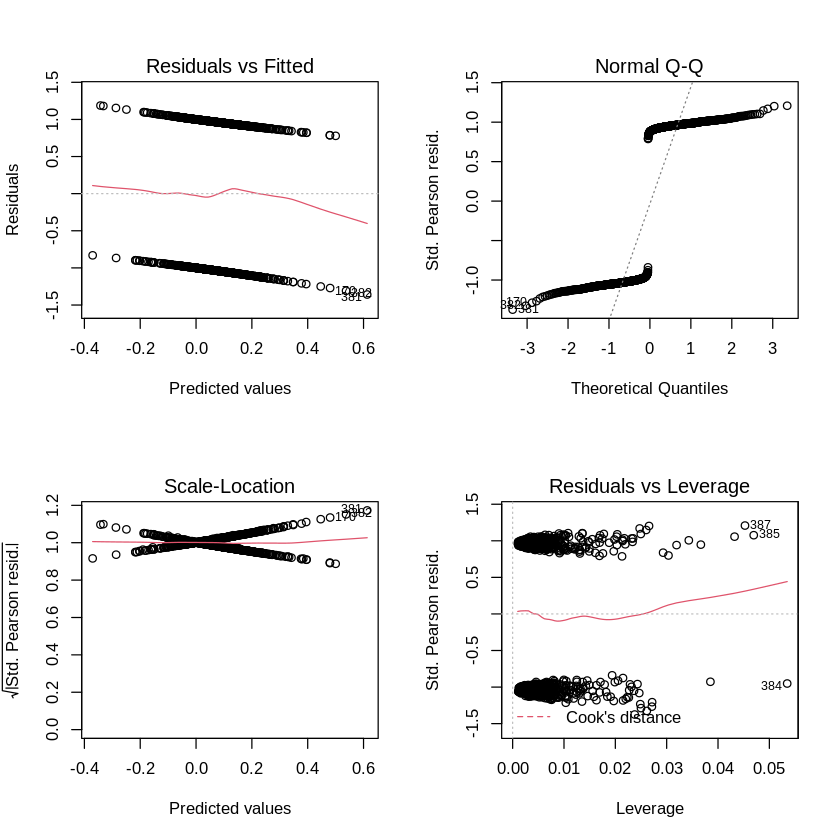
It appears that there are some high leverage points. But clearly, most of the other model fit evaluations that we used for linear regression don’t work for the logistic family.
We can also test the quality of the model fit itself. How do we do that? Use prediction.
# See how well the model captured the training set
glm_prob_df = data.frame(predict(glm.fit, type = "response"))
colnames(glm_prob_df) = c('predicted_prob')

num_observations = nrow(glm_prob_df)
glm_prob_df$index = seq(1, num_observations) #get the observation number for plotting; ggplot does not infer this

# Setting type="response" tells R to output prob. from P(Y=1,X) for all values of X
# "If no data set is supplied to the predict() function, then the probabilities
# are computed for the training data that was used to fit the logistic regression model."

ggplot(glm_prob_df, aes(index, predicted_prob)) + geom_point() + xlab('observation number') + ylab('predicted response probability')
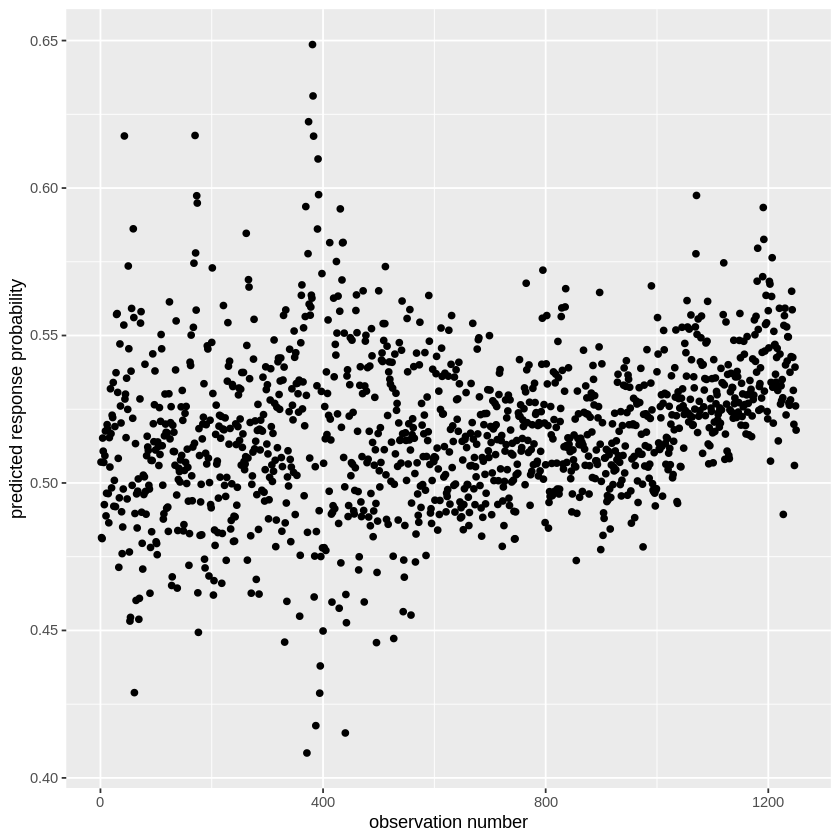
What we are showing here are the predicted Y values for our full model. Notice that they are not binary. Why? Because we are estimating Y as a sigmoid function, as we talked about during the lecture. Thus we aren’t predicting the direction, but the probability of the direction being “Up”. We know that these are the probabilities that the Stock Market will go up rather than down because we can check how R categorized the Direction variable using contrasts().
contrasts(Smarket$Direction)
| Up | |
|---|---|
| Down | 0 |
| Up | 1 |
Thus, if you want to make a binary prediction (i.e., did the market go up or down?), you need to set a threshold for the estimated outcome probability and binarize the result according to that threshold. Let’s try that.
threshold = 0.50 #binarizing threshold

# First make a list of "Downs"
glm_prob_df$predicted_binary=rep("Down",num_observations)

# Then use the probability output to label the up days. Let's use a threshold of 50% probability.
glm_prob_df$predicted_binary[glm_prob_df$predicted_prob>threshold]="Up" #find the rows that have prob > threshold and cast as 'up'

# Now let's look at the prediction accuracy
confusion_df = data.frame(glm_prob_df$predicted_binary, Smarket$Direction)
colnames(confusion_df) = c('predicted', 'actual')

table(confusion_df)
         actual
predicted Down  Up
     Down  145 141
     Up    457 507
This table is sometimes call the confusion matrix. The diagonal values (top left and bottom right) are the frequency of the correct predictions and the off diagonal (top right and bottom left) are the errors. We can estimate the overall accuracy by either summing the diagonal values and dividing by \(n\), the total number of observations, (i.e., (145+507)/1250) or more directly by seeing the average number of times the predicted value matched the observed.
Side note: you can create nicely formatted confusion matrices using the caret package and the fourfoldplot command, though I find the simple table easier to interpret.
# We can calculate the prediction accuracy by counting the number of times our
# prediction vector matched the real data and taking the average
print(paste("Accuracy:",mean(confusion_df$predicted == confusion_df$actual)))
[1] "Accuracy: 0.5216"
This means that we are correct ~52% of the time in estimating whether the market will end up or down on a given day. At first glance this might not seem that bad (it’s better than chance, 50%). However, remember, this is the error on the training data. So the actual performance of this model at predicting the stock market in the future (i.e., test accuracy) may be lower.
Let’s try a case where we try to predict the market performance in 2005, using the pre-2005 data.
# Let's isolate the years before 2005 to use as a training set to predict market change in 2005

# First create an index vector to find the entries corresponding to years < 2005
train_idx=(Smarket$Year<2005)


# Can now make a whole new Smarket dataset just for 2005 (it's the last year, so anything not train is 2005)
Smarket.2005_test = Smarket[!train_idx,] #find rows that do not (! = not) occupy the training data indices

dim(Smarket.2005_test) #get dimensions of the test data

# Now let's extract the Direction for just 2005
Direction.2005_test=Smarket.2005_test$Direction
- 252
- 9
For the sake of simplicity, let’s only use performance from the previous two days to predict the current stock market peformance. In other words, we’ll use this model: $\( y_{direction} = \beta_0 + \beta_1 x_{lag1} + \beta_2 x_{lag2} + \epsilon \)$
# Train the logistic model, but use only the subset of the data from pre-2005 (i.e., training data)
glm.fit=glm(Direction~Lag1+Lag2, data=Smarket, family=binomial, subset=train_idx) #give the training indices to the glm function

# Predict the 2005 performance from the model trained on the pre-2005 data
glm.probs=predict(glm.fit, Smarket.2005_test, type="response")
glm.pred=rep("Down",nrow(Smarket.2005_test)) # There are only 252 observations in the test set.
glm.pred[glm.probs>0.5]="Up" #binarize the result


confusion_df = data.frame(glm.pred, Direction.2005_test) #create confusion df
colnames(confusion_df) = c('predicted', 'actual')

# Show the confusion matrix
table(confusion_df)
         actual
predicted Down  Up
     Down   35  35
     Up     76 106
# Now let's look at the overall test accuracy
print(paste("Accuracy:",mean(confusion_df$predicted == confusion_df$actual)))
[1] "Accuracy: 0.55952380952381"
So this isn’t too bad. We can predict slightly above chance the 2005 performance from a model trained on the previous years.
Notebook authored by Ven Popov and edited by Roberto Vargas, Krista Bond, Charles Wu, Patience Stevens, and Amy Sentis.